3D geometry construction
Solids and classroom primitives
Trimension can place common 3D shapes including cuboids, triangular prisms, rectangular pyramids, tetrahedra, spheres, hemispheres, cylinders and cones.
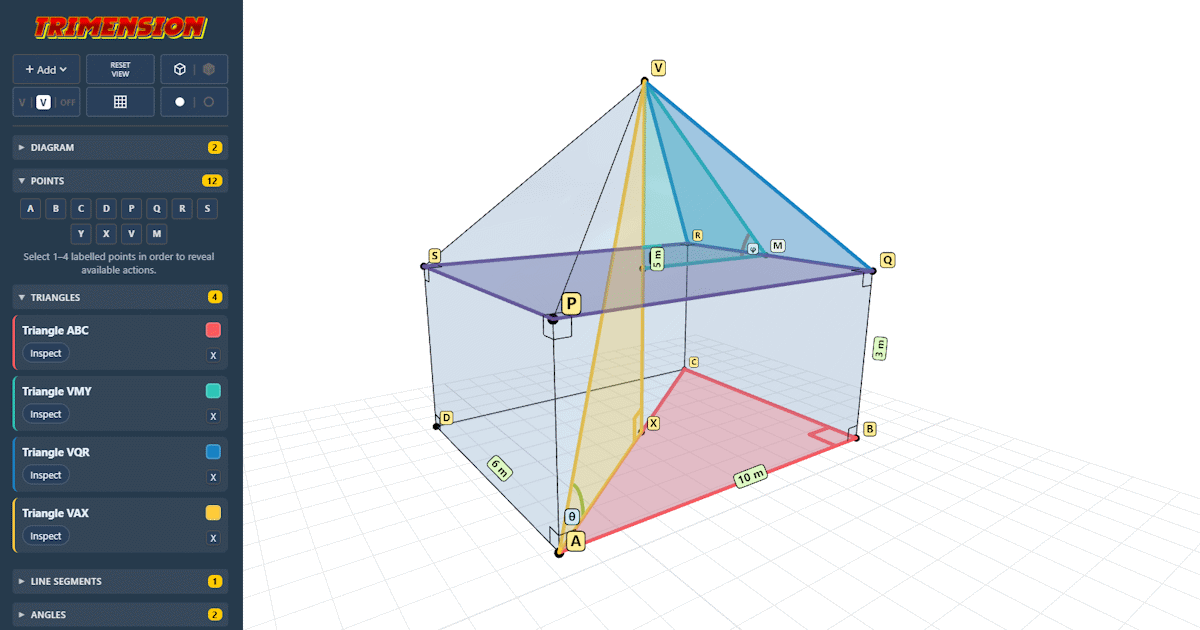
Primitive dimensions can be adjusted, and up to three primitives can be joined together. For example, a cuboid plus a rectangular pyramid can make a simple house object for compound 3D geometry examples.
Point selection and valid actions
Select points in order from the Points panel. Trimension offers context-aware actions for valid selections, such as creating line segments, triangles, quadrilaterals, angle markers and custom labels.
This keeps the focus on the geometry: students can see which points define the object being discussed, and teachers can build the construction step by step.
Ghost faces, labels and display controls
Display controls make it possible to show or hide point markers, label styles, ghost faces and individual created objects. This helps simplify a diagram once the important triangle or plane has been identified.
Pythagoras and trigonometry diagrams
Internal triangles and line segments
Trimension is designed for questions where the useful right-angled triangle is hidden inside a 3D shape. You can draw construction lines between vertices, mark key triangular faces, and isolate the distances involved in the calculation.
Extracted 2D views
The Inspect action opens a clean extracted 2D view of selected triangles and quadrilaterals. This makes the transition from 3D spatial reasoning to a solvable 2D Pythagoras or trigonometry diagram explicit.
Extracted diagrams can be rotated or flipped, keeping the same labels while making the shape easier to read on screen or in a worksheet.
Angles, labels and notation
Angles and labels can be added to support conventional notation. For example, ABC means the angle at B, and custom labels can be used for side lengths, unknowns, angle values or lesson-specific annotations.
Teaching and practical use
GCSE maths and spatial reasoning
Trimension is built for GCSE maths lessons, revision tasks and classroom explanation where students need to identify the correct triangle inside a 3D object before applying Pythagoras or trigonometry.
It is useful for modelling the thinking process: choose a solid, locate points, create the relevant internal triangle, then extract the 2D view students can solve.
Sharing diagrams
Share URL encodes the full diagram into a link, including solids, labels, construction objects and view state. Shared links can be bookmarked, placed in lesson resources or sent to students.
PNG and SVG exports
Trimension can export the current view as PNG for slides and documents, or as SVG for crisp scalable worksheet diagrams. SVG exports preserve labels as editable text in tools that support vector editing.
Access, devices and offline use
Trimension runs in a web browser on desktop, tablet and mobile devices. It includes mouse, keyboard and touch controls for rotating, panning and zooming the 3D view.
On supported devices, Trimension can also be installed as a Progressive Web App. Once cached, it can continue to open and run without a network connection.