Interactive linear algebra
Vectors in 2D and 3D
Vectorama lets you add and manipulate vectors by coordinates or directly on the canvas. In 2D you can use the graph-paper view for quick geometric examples, while 3D mode gives a rotatable scene for spatial vector problems.
This makes it useful for teaching vector addition, scalar multiples, components, position vectors and geometric interpretation.
Matrix transformations
You can enter 2 by 2 or 3 by 3 matrices and see Vectorama analyse the transformation as you type. It can recognise common transformations such as shears, reflections, enlargements and rotations, including the angle of rotation where appropriate.
Vectorama also supports matrix composition, so several matrices can be applied and animated in sequence. This helps students see how each transformation contributes to the final result rather than treating the product matrix as a black box.
When matrices are applied, vectors animate from their original positions to their transformed positions. Any line or plane that has been added is transformed in real time too, so the whole geometric setup changes together.
Eigenvalues, eigenvectors and eigenspaces
For suitable matrices, Vectorama can show eigenvalue and eigenvector information, including eigenspaces in 2D and 3D. This helps connect the algebraic calculation to the directions that remain fixed under a transformation.
Seeing eigenvectors alongside the transformed scene can make diagonalisation, invariant directions and repeated eigenvalues easier to discuss.
Geometry tools
Lines and planes
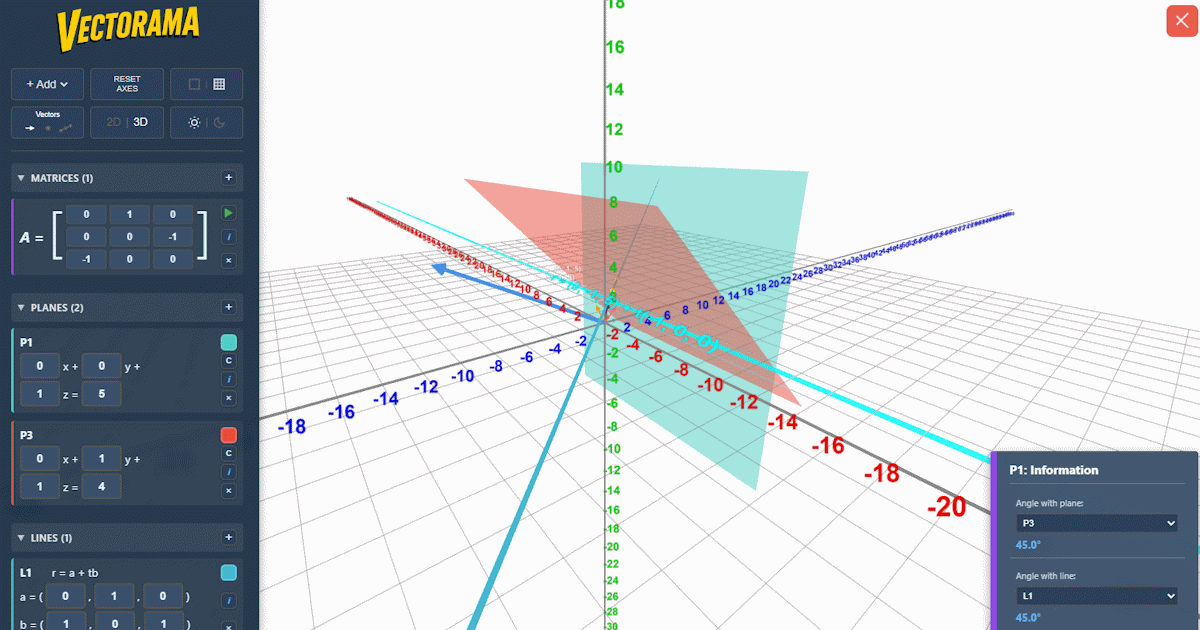
Vectorama can display lines and planes in the forms commonly encountered in A Level Further Maths, including vector, parametric and Cartesian forms where appropriate. You can swap between forms while keeping the same geometric object on screen.
Lines are available in 2D and 3D, while planes become available in the 3D view. This supports topics such as line equations, plane equations, normal vectors and spatial reasoning.
Intersections, angles and distances
Built-in geometry tools help visualise and calculate intersections between lines and planes, lines with lines, and planes with planes. When two planes intersect, Vectorama identifies the equation of the line of intersection.
It can also calculate related measurements such as angles and distances. These are useful for checking solutions and for showing how formulae connect to the picture.
Lattice and transformation views
The lattice overlay gives a clear way to see how a matrix transforms the whole plane, not just individual vectors. Density controls let you simplify or enrich the visual depending on the example.
In 3D, orbit controls let you rotate, zoom and pan around the scene so that planes, lines and transformed objects can be viewed from a useful angle.
Teaching and practical use
AQA Level 2 Further Maths and A Level
Vectorama is ideal for AQA Level 2 Further Maths, A Level Maths and A Level Further Maths, especially for topics where a static diagram can hide the important idea.
It can support lessons and revision on vectors, transformations, matrix multiplication, determinants, eigenvectors, 3D coordinate geometry, lines and planes.
It is especially useful when students need to see a calculation and a geometric object at the same time.
Worksheets and guided examples
The Korovatron worksheets page collects printable tasks that can be used with the app, alongside resources for other Korovatron apps. These are intended for classroom practice, revision and structured exploration of matrix and vector topics.
Examples can be built in the app, adjusted live during teaching, and revisited when students need a more visual route into a calculation.
Access, devices and offline use
Vectorama runs in the browser on desktop, tablet and mobile devices. It includes touch-friendly controls for panning, zooming, rotating and interacting with mathematical objects.
On supported devices, Vectorama can also be installed as a Progressive Web App. Once its files have loaded and cached, it can continue to open and work without a network connection, which is useful in classrooms and places with unreliable Wi-Fi.
On iPhone and iPad, open Vectorama in Safari, tap the Share button, then choose Add to Home Screen. On Android and desktop browsers, installation is usually available from the browser menu or address bar when supported.
Sharing and saved setups
Vectorama can preserve app setups locally and supports sharing suitable configurations by URL. This helps with preparing examples, sending tasks to students and returning to a diagram later.
Because the app is interactive, shared setups can become starting points for exploration rather than just finished answers.